Actions
Bug #4277
open
AK
SD
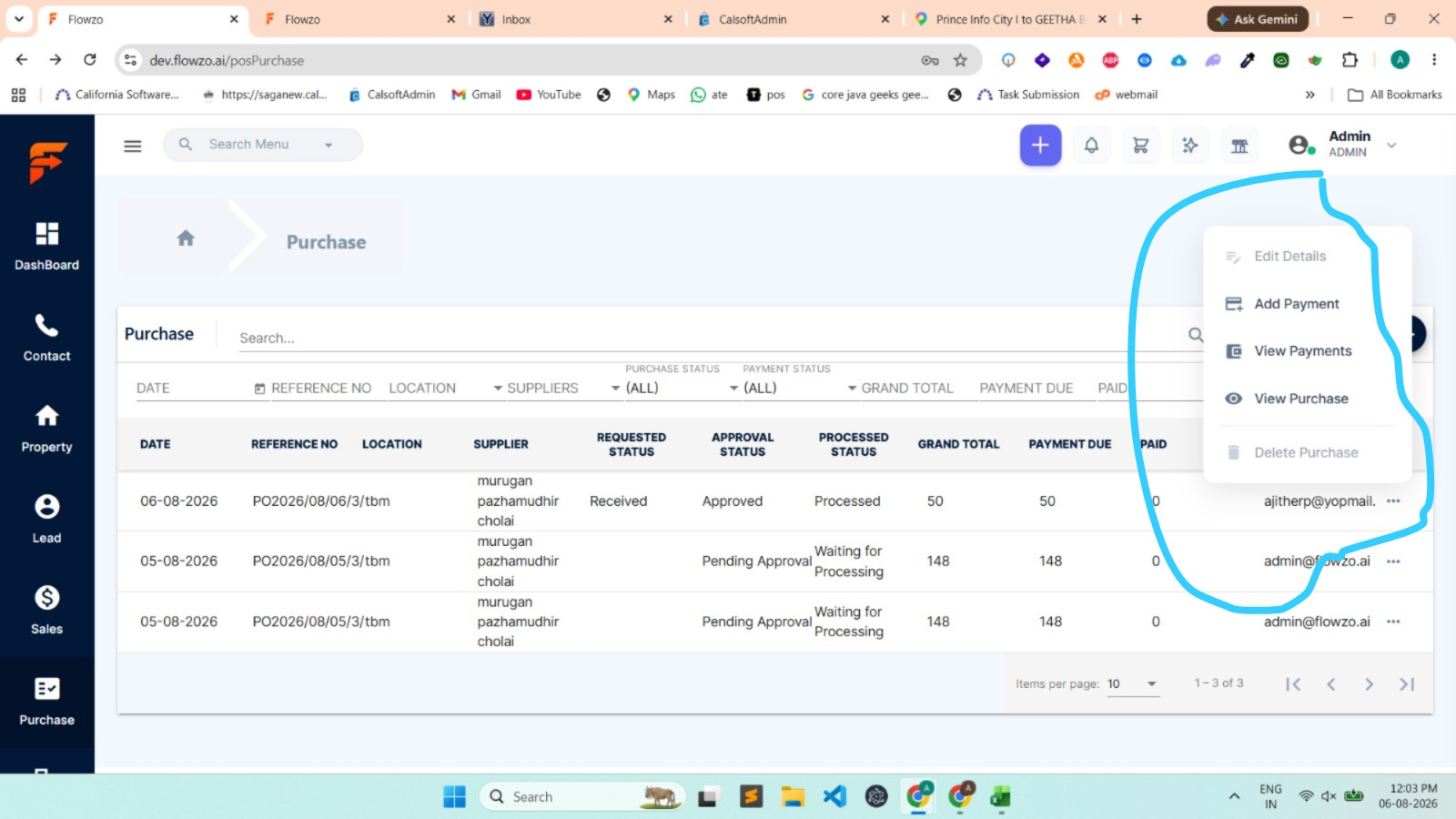
Edit and Delete options are not clickable in Purchase module despite access being granted
Bug #4277:
Edit and Delete options are not clickable in Purchase module despite access being granted
Start date:
Due date:
% Done:
0%
Estimated time:
Description
Short Description:
In the Purchase module, users who have been granted Edit and Delete permissions can see the respective icons/buttons. However, the options are not clickable, preventing users from editing or deleting purchase records.
Steps to Reproduce:
Login as an Admin.
Grant Edit and Delete access for the Purchase module to a user.
Save the access settings.
Login with the user account.
Navigate to the Purchase module.
Observe the Edit and Delete options for any purchase record.
Try clicking the Edit or Delete option.
The Edit and Delete options are visible but are not clickable, preventing users from editing or deleting purchase records.
credentials:
ajitherp@yopmail.com
Welcome@123
Files
No data to display
Actions