Actions
Bug #3431
open
PS
SD
Refresh Displays Live Data Instead of Selected Filter Data
Bug #3431:
Refresh Displays Live Data Instead of Selected Filter Data
Start date:
Due date:
% Done:
0%
Estimated time:
Description
"1. Log in to Enterprise Monitor.
2. Navigate to the Dashboard.
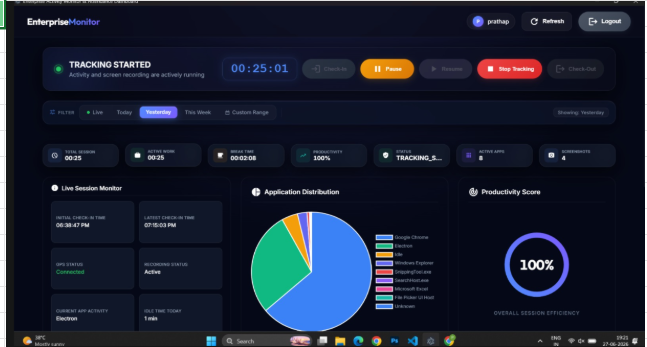
3. Select any filter such as Today, Yesterday, or Custom Range.
4. Verify that the filtered data is displayed.
5. Click the Refresh button.6. Observe the displayed data."
After clicking Refresh, the dashboard automatically displays Live data instead of the data for the selected filter, even though Today, Yesterday, or Custom Range is selected.
Files
No data to display
Actions